THE ART OF PROCREATING
STEVE LILLIE - DOUBLE TAPPING
I’ve been creating artwork mostly on a computer for a while now. I remember a tricky period of adaptation but I’ve come to totally rely on painting digitally, as it’s cheaper than buying art materials, faster to paint, easy to edit, and speedy to deliver.
I remember watching a documentary about David Hockey called “Painting With Light”, which was made way back at the dawn of digital painting. At the time, I was still producing all my images in the traditional way—trying to dry paint using a hair dryer, before the courier arrived. Eventually, it became clear that I would have to go digital. Speed is an important factor for cartoonists, and it was clear, then, that if I was going to stay in business, digital was going to be the future for me. (This was still a time when there was a future, before AI shamelessly stole all of our work.)
Personally, I liked the idea that you could work over a canvas as long as you wanted, and the colours would stay fresh. Plus, you can undo all your mistakes so easily. However, it’s worth remembering, that are no real life colours as bright as RBG, and—as the documentary said—it is painting with light. What you see on the screen isn’t necessarily the way it’s going to look in print. Working with RBG is a positive advantage if the publication is digital!
Also, no digital device is ever going to give you an exact replica of what can be achieved with a pen, pencil, or brush. You’re never going to be able to draw like Glenn Marshall on an iPad or in Photoshop (well no one can draw like Glenn Marshall, but you know what I mean!).
There’s no denying that digital technology is very clever, although when it comes to art, it doesn’t have the random ‘happy accidents’ or the toothy authenticity of analogue methods. However, for the cartoonist, there are plenty of digital techniques that will allow you to add expressive lines, or ‘painterly’ textures, if that’s what you want.
CHOICES
Photoshop has been the ‘arty’ program of choice for decades now. Illustrator is also popular but specialises in producing those clean, vector graphic images that are still fashionable (for some reason), although it’s so far from an analogue drawing experience that there are times that it feels like you’re painting with maths. I’ve used it myself for years and, despite many fine features, it will drive you mad. Let’s never speak of it again.
Recently I’ve been considering updating Photoshop, but it’s now a monthly subscription! So rather than give the eye-watering fee to Adobe to rent their new (and apparently pants) version of Photoshop, I thought I’d give Procreate a go.
Procreate costs about £13 for one-off purchase, which is less than the cost of one bottle of Higgins ink. And, of course, Procreate has an unlimited supply of ink.
I’ve only been messing about with it for a short while; it’s been a fun and frustrating learning experience.
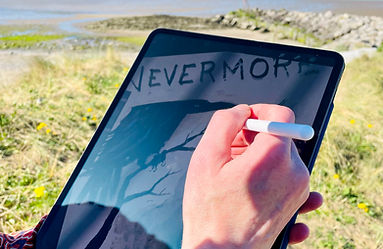
With Photoshop I was always ‘remote drawing’—looking at the screen, rather than what my pen was doing on the drawing tablet—which you do get used to, but is really weird. I’ve always wanted to get as close as possible to the traditional drawing experience, with the benefits of digital. With Procreate I can now draw directly on screen, which feels much more like proper art making. Drawing on glass has a different texture to paper, but I believe you can buy a screen cover to add the feel of paper to your mark-making.
The first thing I liked was the brushes. There’s a good selection, and many feel quite authentic, especially the drawing brushes, which are quite different from the sketching brushes. The pressure sensitivity is good (after some adjustment) although I find that some brushes equate light pressure with, not only a thin line, but a light tone. Each brush can be tweaked with a bewildering number of settings, and it’s clearly going to be a while before I get everything ‘just so’. I’m keen to create my own brushes, which I don’t know how to do yet. I’m also confused that the paint-like brushes are very light and lacking in opacity—even the gouache selection. No doubt there’s a fix for that. In fact there are a fair few fixes needed…
CHANGES
There are a number of things that need adjusting straight away. Firstly, the pressure sensitivity is not suitable for drawing, and you end up pressing too hard on the iPad. This can easily be changed in the settings.
The brush cursor is not even visible when you first open the app. That needs to be turned on, and the contrast pushed up. If you have the fancy Apple Pencil, it’s far too easy to toggle between brush and eraser. You might not even notice this function change, and start erasing your work. I’ve found that it’s better to turn the function off entirely.
Also, turn off the gesture control, otherwise you’re constantly making unwanted marks on your image.
All of these adjustments are under the Spanner icon (or Wrench if you are American). The exception is the Apple Pencil fix, which is in the Settings. (I’m starting to think that paying extra for the fancy pencil was a waste of money.)
If you’ve used Photoshop, everything is going to feel quite familiar. There are gestures instead of keyboard short cuts to learn, and things work a little differently, but it’s basically the same. I can’t find any filter effects, but who uses those anyway?
Basically, Procreate is sort of a Photoshop lite… but there are some bizarre omissions. There are no rulers! There should be rulers. There’s not much in the default palettes, so you must create your own—which is fine once you’ve gone through the hassle of working through the process, but it would have been handy to at least have some skin tones.
I recommend finding a beginner’s guide on YouTube, or similar. This will save you much screaming into the void, because the app is not set up correctly in the first place.
Despite some snags, I’m very impressed with Procreate, especially at the price. I think it’s certainly possible to do without Photoshop entirely (as a cartoonist) and save £20 per month. It’s a powerful app, and functions very smoothly. If you already have an iPad, there’s no reason not to give it a go. I’ve already had many hours of fun playing around with it and I can now produce artwork anywhere (within reason)! Doodling in front of the telly is now a thing, or would be, if I had a telly.
It’s ironic that so much technology, time, money, and expertise has gone into replicating what a pencil and paper does. But that’s the world we live in, where even books and fags are electronic. At least beer is still analogue. So far…


DIGITAL ORIGINS...
1986 Documentary with David Hockney